AI & Development
How AI Agents Remember: OpenClaw, Claude Code, Codex, Hermes and Instinct
Context rot, compaction, dreaming, second brains — how OpenClaw, Claude Code, Codex, Hermes and Instinct actually handle memory, and what it means for your business.

On this page
- Context Rot: Why Your AI Gets Dumber the Longer You Talk to It
- How the Agents You’ve Heard Of Actually Remember
- Claude Code
- Codex
- OpenClaw
- Hermes Agent
- Instinct
- Side by Side
- Karpathy’s LLM Wiki and the “Second Brain” Craze
- RAG, GraphRAG and the Memory Startups
- Where It’s All Heading
- The Cheat Sheet: Memory Words You’ll See on Tech Twitter
- What This Means for Your Business
- Want Help Getting Your AI to Actually Remember?
Every time I run an AI workshop, there’s one thing I always end up explaining. It’s not which model to pick or how to write a prompt. It’s context.
You start a session and the AI is sharp. An hour in, it’s forgetting things you told it, repeating itself, and getting sloppy. You open a new session and it has no idea who you are. Back to zero.
Andrej Karpathy — founding member of OpenAI and the guy who coined “vibe coding” — put it best: “LLMs are quite literally like the guy in Memento.” Brilliant in the moment. No long-term memory. Tattoos and sticky notes to get through the day.
In my opinion that’s the biggest issue with AI right now. Not intelligence — the models are plenty smart. It’s what they know about you, your business and the work they’re doing, and how they hold onto it.
And if you’ve spent any time on tech Twitter lately, you’ve seen the words fly past: context engineering, context rot, compaction, dreaming, second brain, LLM wiki, skills, subagents. Everyone’s building memory into their agents. So in this one I want to break it down: why AI forgets, how the agents you’ve actually heard of — OpenClaw, Hermes, Claude Code, Codex and Instinct — each handle it, and what it means for your business.
Context Rot: Why Your AI Gets Dumber the Longer You Talk to It
First, the basics. There are really only three places an AI can “know” something:
- The weights — everything it learned in training. Karpathy describes this as a hazy recollection, like something you read a year ago. Broad, fuzzy, and it knows nothing about your business.
- The context window — everything in the current conversation. This is working memory. Sharp, but temporary, and it has a limit.
- External memory — anything stored outside the model and pulled back in when needed. Files, notes, databases.
The obvious fix is “just make the context window bigger.” Models now take a million tokens — thousands of pages. Throw it all in and let the AI sort it out?
It doesn’t work like that, and the research is piling up:
- Lost in the middle. Models are best at using what’s at the start or end of their input, and noticeably worse at what’s buried in the middle. (Liu et al.)
- Context rot. Chroma tested 18 leading models and found performance drops as the input gets longer — even when the task doesn’t get any harder. One passage that looked relevant but wasn’t was enough to make results worse. (Chroma)
- Big windows, shallow reasoning. A 2026 study found the latest frontier models could all find a single fact in a million tokens perfectly — but their ability to reason across several facts fell away past roughly half a million. (Chow, 2026)
Anthropic describe context as an attention budget — every extra token spends some of it. (Anthropic) That’s why the phrase everyone’s using now is context engineering: the skill of putting exactly the right information in front of the model for the next step. Not more. Not less.
This is exactly what I tell teams in training. More context isn’t more intelligence. The right context is.
So every agent builder is solving the same problem: how do you store what matters, and load back only the right bits at the right time? Here’s how the big names do it.
How the Agents You’ve Heard Of Actually Remember
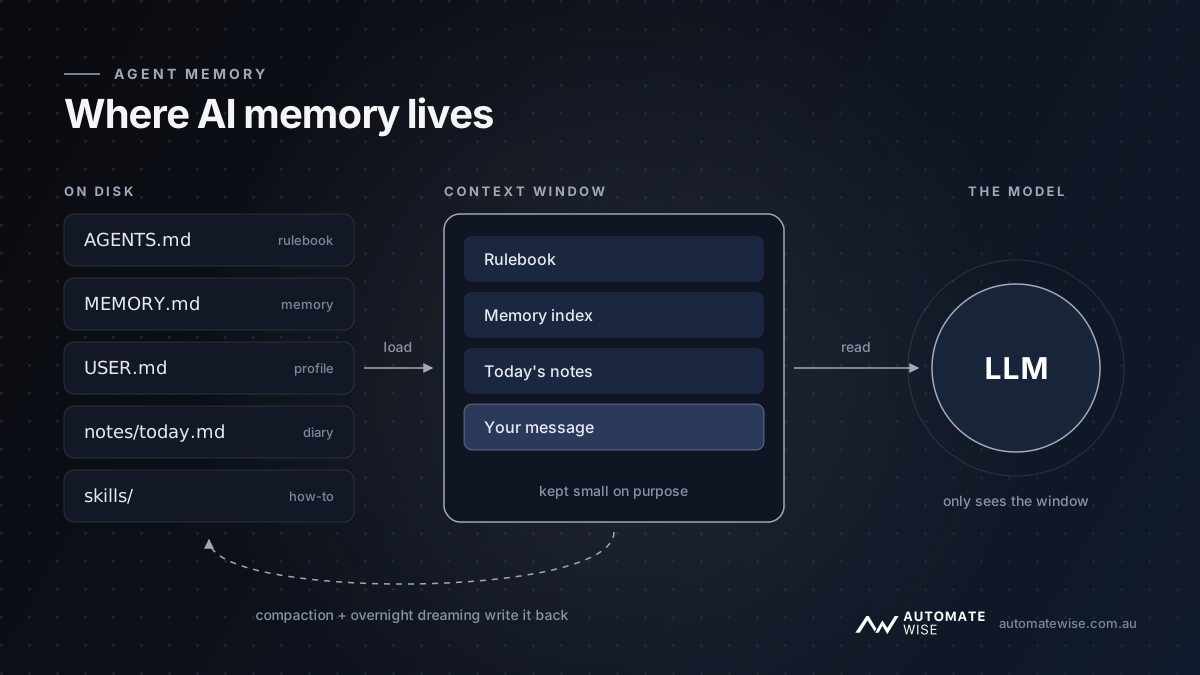
Here’s the funny part. Under the hood, almost all of them do it the same way: plain text files. Markdown. Notes the AI reads at the start of a session and writes to as it works. The differences are in what gets loaded, when, and who does the tidying up.
Claude Code
Claude Code is Anthropic’s agent and the one I use every day.
- The rulebook:
CLAUDE.md. A file you write with instructions — how your business works, how you like things done, where things live. It loads at the start of every session. As of September 2026 it’ll also readAGENTS.md(more on that below). (docs) - Auto memory. Since February 2026, Claude writes its own notes as it works — your preferences, corrections you’ve given it, project facts. They’re stored as a
MEMORY.mdindex plus small topic files. The first 200 lines of the index load each session; the detail gets read only when it’s relevant. It stays on your machine. - Compaction. When a conversation fills up, Claude summarises it and carries on — then re-reads your rulebook, its memory and recently changed files from disk. The catch: anything important you only said in chat can get lost in the summary. If it matters, it belongs in a file. (docs)
- Subagents and skills. Heavy research gets handed to a subagent with its own clean context, and only a short summary comes back. Skills and connected tools sit as one-line labels until they’re actually needed — so they don’t eat the attention budget.
Funnily enough, while drafting this post, Claude Code pulled context from its memory files and from my own knowledge base — which I’ll get to shortly.
Codex
Codex is OpenAI’s equivalent, and it’s converged on almost the same design.
- The rulebook:
AGENTS.md. A global file, plus project files layered on top — the closest one to the work wins.AGENTS.mdhas become the cross-tool standard, now looked after by the Linux Foundation, which is why Claude Code started reading it too. (docs) - Memories (opt-in). Since April 2026 you can switch on Memories. Once a chat has gone quiet for a few hours, Codex reviews it in the background, strips out anything secret, and files away lessons in a memories folder. Each new session gets a short summary (about 2,500 tokens) and it searches the rest when needed. (docs)
- Compaction. At 90% full, Codex writes itself a handoff note — literally a briefing for “another AI” taking over the task — and keeps going from there.
- Subagents and skills. OpenAI’s own docs name context rot as the reason subagents exist. Skills load progressively, same as Claude.
OpenClaw
I’ve written about OpenClaw before — the open-source agent you talk to over Telegram and WhatsApp. I run it on an old laptop. Its docs say it plainly: the agent only remembers what gets saved to disk. There’s no hidden state. (docs)
- A folder of notebooks.
SOUL.md(its personality),AGENTS.md(operating rules),USER.md(your profile),MEMORY.md(durable facts and decisions), and a daily diary for each day. - What loads. Your profile and the long-term memory load at the start; today’s and yesterday’s diaries load on a fresh session; older diaries get searched only when needed.
- Memory flush. Before a long conversation gets compacted, OpenClaw quietly prompts itself to save anything important to file first. Smart.
- Dreaming. Since August 2026 it’s on by default: every night at 3am it reviews recent notes and promotes the things that keep coming up into long-term memory. (docs)
- It learns skills. Corrections and procedures that worked get turned into reusable skills automatically.
Two watch-outs. By default, every DM across every app is one continuous conversation — great if it’s just you, a privacy problem if more than one person messages it. (docs) And memory files are valuable: in February 2026, infostealer malware was caught grabbing OpenClaw’s soul.md and MEMORY.md along with its access token. (BleepingComputer) Treat your agent’s memory like you’d treat a password manager.
Hermes Agent
Hermes Agent from Nous Research takes the opposite approach to “remember everything.” I’ve got it set up as a chief-of-staff agent.
- Two deliberately tiny notepads.
MEMORY.md(about 800 tokens) for its own notes andUSER.md(about 500 tokens) for your profile. When they fill up, the agent has to consolidate — rewrite and merge — to make room. The maintainers say the cap is intentional. (docs) - Searchable history. Every past conversation is stored in a database it can search when it needs something older.
- A frozen snapshot. Memory loads once at the start of a session and doesn’t change mid-chat (it keeps things fast and cheap) — so something saved today shows up next session.
- The learning loop. This is Hermes’s big idea. After a task, a background review saves lessons and turns repeated workflows into skills — what they call procedural memory. A “curator” retires skills that go unused for a month. (docs)
- Bring your own memory. You can plug in memory services like Mem0, Honcho or Supermemory alongside the built-in notepads.
One tip straight from their docs: start fresh sessions regularly. A weeks-long chat quietly defeats the learning loop and inflates your costs.
Instinct
Instinct is the AI assistant living in iMessage that’s taken off recently, and its memory is noticeably good. In September, Dhravya Shah — founder of memory company Supermemory — reverse-engineered how it works by probing it from the outside.
- A git-tracked wiki. Plain markdown files organised into folders — people, organisations, facts, preferences, decisions, a daily and weekly timeline, active workstreams — with every change kept in history.
- Aliases, not embeddings. Each file has a small header with an ID, type and the other names a thing goes by. There’s no vector database; retrieval is basically keyword search, which is why the aliases matter.
- A small, curated brief. Each conversation gets roughly 14,000 tokens: a short profile of you, a one-page memory summary rebuilt daily, a recap of recent conversations and open loops, and your current to-dos.
- Tidied overnight. A daily process consolidates and compresses what it learned. During a conversation it reads memory; it doesn’t rewrite it on the fly.
Shah’s verdict: excellent at explicit recall — who is this person, what did I decide about that — weaker at quietly connecting dots across lots of separate conversations.
Side by Side
| Rulebook | Memory it writes | Loaded every session | Long conversations | Overnight “sleep” | Learns skills | |
|---|---|---|---|---|---|---|
| Claude Code | CLAUDE.md (+ AGENTS.md) | Auto memory | Rulebook + memory index | Compacts, re-reads files | No | Skills you add |
| Codex | AGENTS.md | Memories (opt-in) | Rulebook + ~2.5k-token summary | Handoff note at 90% | Reviews idle chats | Skills you add |
| OpenClaw | SOUL.md + AGENTS.md | MEMORY.md, USER.md, diaries | Profile, memory, last two days | Memory flush, then compacts | Dreaming, nightly | Yes, automatically |
| Hermes | SOUL.md + AGENTS.md | Tiny MEMORY.md + USER.md | Frozen snapshot | Compresses at 50% | Background review | Yes, with a curator |
| Instinct | Identity profile | Git-tracked markdown wiki | ~14k-token curated brief | Conversation recap | Daily consolidation | No |
Notice the pattern? A rulebook you write. Notes the AI writes. A small slice loaded up front, the rest searched on demand. A summary when things get long. And increasingly, a “sleep” cycle to tidy up. Every one of them is text files you can open and read.
That’s not a coincidence. It’s the idea Karpathy’s been pushing.
Karpathy’s LLM Wiki and the “Second Brain” Craze
In early April 2026, Karpathy posted about building personal “LLM knowledge bases” — and it blew up to tens of millions of views. A couple of days later he published the method as an “idea file”: a document you paste into Claude Code or Codex so it can build its own version for you. (Karpathy’s gist)
Three layers:
- Raw sources — articles, PDFs, transcripts, notes. The AI reads them but never edits them.
- The wiki — a folder of markdown pages the AI writes and maintains. One page per person, company or topic, all linked.
- The rules — one instructions file (a
CLAUDE.mdorAGENTS.md) telling the AI how to organise and maintain it.
And a loop: ingest a new source and the AI updates every related page; query it and the AI answers from the wiki with citations — and files good answers back in as new pages; lint it every so often to catch contradictions, stale claims and missing links.
The key difference from traditional search: most AI “chat with your documents” tools rediscover your knowledge from scratch on every question. The wiki compiles it once and keeps it current. Knowledge compounds instead of evaporating. And at a hundred-odd sources, Karpathy found a simple index file was enough — no fancy database. You open the folder in Obsidian and you can read exactly what your AI “knows.”
His four reasons it beats an AI that supposedly “just gets smarter the more you use it”: the memory is explicit (you can see it), yours (on your machine), plain files (works in any tool, forever), and any AI (swap models whenever — the memory comes with you).
The community ran with it. The biggest build is GBrain from Garry Tan, CEO of Y Combinator — over 30,000 GitHub stars — which adds proper search and a nightly “dream cycle” on top. I run GBrain myself: my meeting recordings sync into it automatically every 15 minutes, and my agents query it when they need context, so I’m not re-explaining a client or project every time I open a new session.
Where it breaks:
- Scale. Past a few hundred pages, simple search gets slow and you need a real search engine again. (Neo4j)
- Baked-in mistakes. If the AI summarises something wrong once, the error lives in the wiki until someone catches it.
- Teams. It was built for one person. Multiple people editing at once causes conflicts, and there are no permissions. (Atlan)
- Noise. People who auto-captured everything found their wiki filled with junk and switched to explicitly telling the AI what to remember. (Hadi Javeed)
RAG, GraphRAG and the Memory Startups
Before the wiki craze, the standard answer was RAG (retrieval-augmented generation): chop your documents into chunks, turn each into numbers that capture its meaning, and fetch the chunks closest to the question. It’s great for lookups — what’s our refund policy? — and it’s how most “chat with your documents” tools work. Where it falls over is connecting the dots across everything.
GraphRAG, from Microsoft Research, fixes that by having an AI map out the people, companies and relationships in your data, group them into clusters and pre-write summaries — so it can answer big-picture questions like what are the recurring risks across all our jobs? It beat standard RAG on comprehensiveness in most of Microsoft’s tests, but building the graph is expensive. Their follow-up, LazyGraphRAG, cut indexing costs to roughly normal-RAG levels. (Microsoft Research)
We’ve felt this first-hand building Tax Guru, our AI platform for accounting firms. Searching tens of thousands of chunks is fast. The bigger lesson has been that how you structure and layer the knowledge matters far more than how much you throw in.
Then there’s the wave of memory layer startups — plug-in services that store what your AI learns: Mem0 (extracts facts from conversations), Zep / Graphiti (a knowledge graph that knows when a fact stopped being true), Letta (git-backed memory with a background “sleep-time” step) and Supermemory (a memory API that merges and forgets for you).
They all claim to top the memory leaderboards. Take that with a big grain of salt. An independent audit this year found around 6% of the answer key on one of the most-used benchmarks is simply wrong, and its AI judge accepted a majority of deliberately wrong answers. (Penfield Labs) Letta even showed a plain filesystem agent beating a dedicated memory product’s reported score. (Letta) Pick a memory system off your use case, not a leaderboard.
Where It’s All Heading
Zoom out and everyone — Karpathy, Anthropic, OpenAI, OpenClaw, Hermes, Instinct — is converging on the same handful of ideas:
- Keep the context small and curated. Hand-pick what goes in. Don’t dump.
- Store memory somewhere you can read it. Text files you can open, check and fix — not a black box.
- Let it sleep. A background cycle that consolidates, updates and prunes.
- Turn experience into skills. Not just remembering facts, but remembering how to do things.
- Add search when it outgrows a simple index. Files for the truth, search for scale, graphs for relationships.
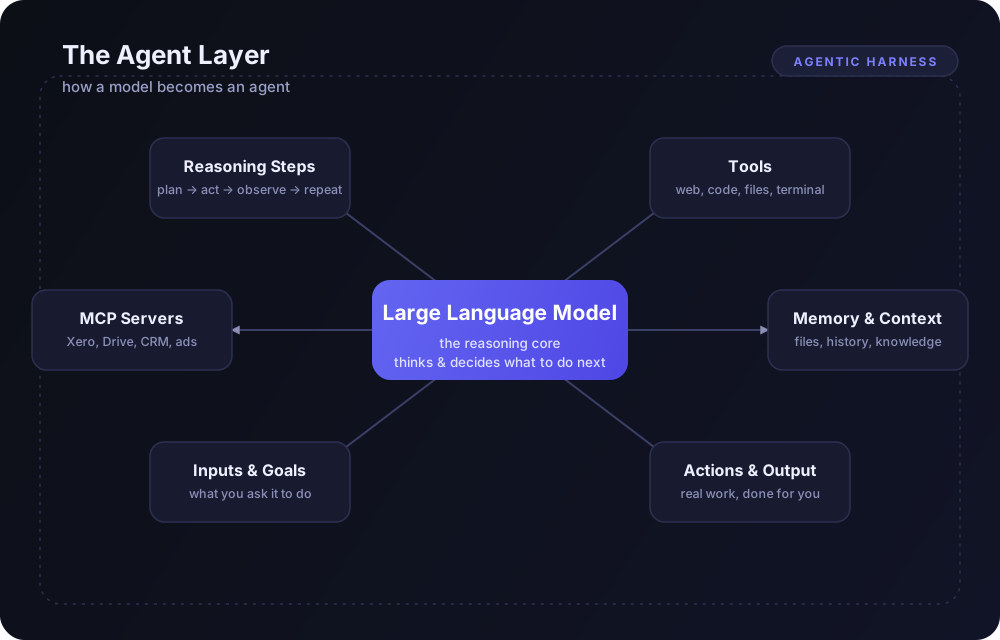
The memory layer is becoming part of the agentic harness — and like everything else in the harness, how you set it up matters more than which logo is on it.
The Cheat Sheet: Memory Words You’ll See on Tech Twitter
| Term | What it actually means |
|---|---|
| Context window | The AI’s working memory — everything it can see right now. |
| Context engineering | Choosing exactly what the AI sees for each step. |
| Context rot | The AI getting worse as the conversation gets longer. |
| Compaction | Summarising a long conversation so the work can continue. |
CLAUDE.md / AGENTS.md | The rulebook file you write for your agent. |
MEMORY.md | The notes file the agent writes for itself. |
| Skills | Instruction folders the AI only loads when it needs them. |
| Subagents | Helper agents with their own clean memory that report back a summary. |
| MCP | A universal plug connecting AI to your apps and data. |
| Harness | Everything wrapped around the model — tools, rules, memory. |
| Dreaming / sleep-time | The agent tidying up its memory between sessions. |
| Second brain / LLM wiki | A folder of linked notes the AI builds and maintains for you. |
| RAG | Fetching the most relevant chunks of your documents for each question. |
| GraphRAG | RAG plus a map of how everything in your data connects. |
| Memory layer | A plug-in service that stores what your AI learns. |
What This Means for Your Business
Here’s the practical bit.
An AI agent is only as useful as what it knows about your business — your clients, your processes, your pricing, the decisions you’ve already made and why. Without that, every session starts from zero and you spend half your time re-explaining.
And look at what every one of these tools reads first: a plain text rulebook and a set of notes. Those files are the new SOPs. The businesses that write them down well are the ones whose AI actually performs.
For most businesses you don’t need GraphRAG or an enterprise memory platform. You need:
- A rulebook. A clear
CLAUDE.md/AGENTS.mdthat explains how your business works and where to find things. - A well-kept knowledge folder. Your processes, clients and decisions in plain documents an AI can navigate.
- A habit of curating. Deliberately saving what matters — not auto-dumping every email and meeting.
- Ownership and security. Keep memory in files you control so you can switch tools without losing it — and protect those files like you’d protect your passwords.
Start there. Add search when it gets big. Reach for graphs when you genuinely need to connect the dots across a lot of data.
Want Help Getting Your AI to Actually Remember?
This is what we do at Automate Wise. We design and build the knowledge layer your AI runs on — from a simple, well-structured rulebook and knowledge base to full custom systems like Tax Guru — and train your team to keep it working.
If your AI keeps forgetting who you are, book a conversation. Let’s fix the memory, not just swap the model.